Tuesday, February 3, 2009

How To Import 102: SNES/Super Famicom and N64

Importing for the SNES or Super Famicom, and importing for the N64


To continue in the How To Import series, I'll start this post of with the Super Famicom (the Japanese name for the Super Nintendo.)

It's really easy to get Japanese Super Famicom (SF) games to play on your American console, but there is a bit of risk, and it isn't QUITE perfect.

For the vast majority of SNES/SF games only have a physical region lockout. As such, the only thing keeping you from playing these games is two little plastic pieces that block a Japanese cart from reaching the pins. Carefully break these pieces off with a pair of needle-nose pliers, and voila! You can play Japanese Super Famicom games on your American SNES!
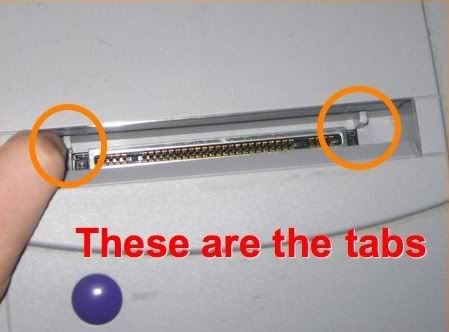
SNES mod

For more detail plus pictures, try this site: Step-by-step Instructions for How to Mod your Super Nintendo to Play Super Famicom Games

The only catch is that a FEW games are locked out using a CIC check. Getting around this is seems to involve modifying the cart itself, and really isn't recommended, especially if you're a collector. Then again, if you're REALLY a collector, you'll want to buy a Japanese Super Famicom instead of breaking off anything in your American one, but that's all up to you.

If you own the SNES Jr. (the smaller remake of the console), here's a great way to mod it without actually breaking any part of the console:


http://www.youtube.com/watch?v=Jm7-OZmmt7s

Modifying a Nintendo 64 is very similar, but admittedly a bit more difficult. The plastic pieces don't break off nearly as easily, but the method is more or less the same. To do it safely, it takes a bit of work and a tool or two (most notable the Gamebit and Triwing screwdriver tools, special screwdrivers for opening Nintendo consoles and cartridges), as described here: N64 Import Mod. You could probably just use pliers to reach in and break them off like the SNES mod, but it is pretty easy to break more than what you meant to this way. Of course the SAFEST way is still to buy a Japanese N64, but that's also the most expensive method (assuming all goes well).

To buy a Super Famicom, try HERE

To buy a Japanese N64, try HERE

To buy a Gamebit or Triwing tool, try HERE

Have fun playing!
-Kuromatsuri

Sunday, February 1, 2009

How To Import 101: NES/Famicom

Importing for the NES or Famicom


So, my discussion in my previous post about why Final Fantasy VII Advent Children Complete that comes with the Final Fantasy XIII playable demo is easily playable on local consoles reminded me that perhaps not everyone out there knows what can be imported and played with no problems, and how to get around the ones that can't. This will take several posts, but I'll start off with Nintendo consoles, move on to Microsoft consoles, and then finish with Sony consoles.

First, Nintendo:

The original NES (or Famicom in Japan):

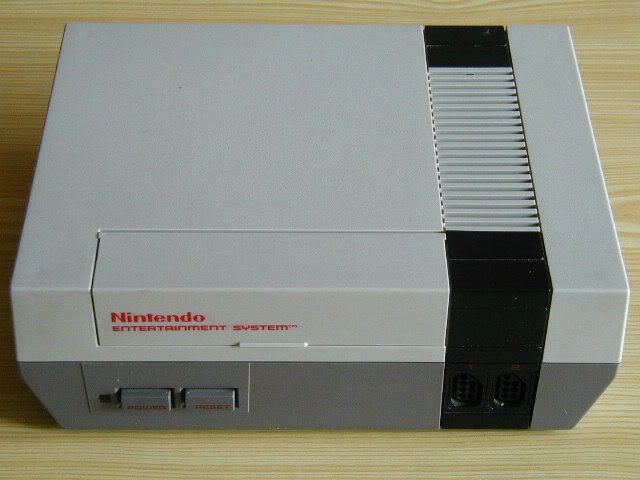
Here's the original NES, the one you probably know all too well:
Original NES

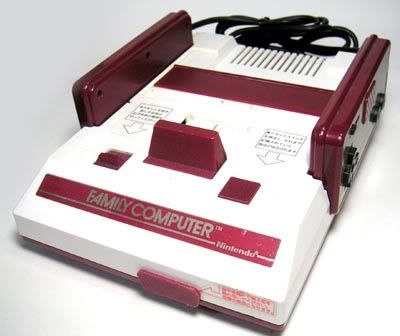
And here's the original Famicom, the one released in Japan:
Original Famicom

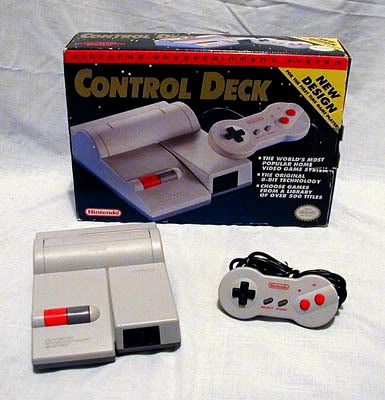
The only REAL difference between the two (at least as far as importers are concerned) is the fact that they use a different number of pins for putting games in the console. As such, as a stand-alone, imported games will not work in your home console. What's more, Japanese games are much smaller in size than American ones. They wouldn't even reach the pins, unless you happen to have one of the top loaders shown here:
Top Loader

With the top loader, both the Japanese and the American models look very similar (though, since the original Japanese one already loaded from the top, the re-release was called the A/V Famicom instead, due to the fact that it could use normal A/V cables. The composite ones. The red, white, and yellow ones =P). However, they STILL use a different number of pins, so importing isn't straightforward.

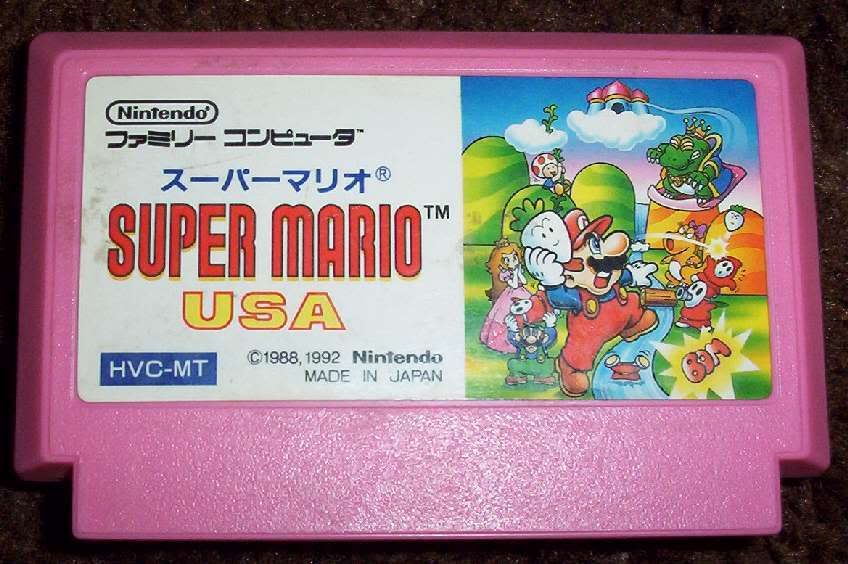
Here's what a Japanese cartridge looks like:
Photobucket

There are a couple of options for making Japanese cartridges work. The cheapest method is a pin adapter. It simply takes the pins from the Japanese games and attempts to reroute them to the proper pins for the American console. It doesn't always work. Also, there are a number of more sophisticated adapters, and they often have a mini-Famicom built in to the adapter itself to get more accurate gameplay. However, all of the ones I've seen and tried have truly crappy build quality, and they are far from recommended.

Furthermore, the original Famicom isn't recommended. Unless it's modded, the original Famicom only uses an RF out, and Japanese channels are at different frequencies than American channels, so you might not be able to tune in to the frequency the original Famicom produces. You might get lucky around channels 95 or 96 or so, but you don't want to count on getting lucky.

The recommended option is unfortunately the most expensive. And that is to import an A/V Famicom. That is the only way to consistently play these games in their original quality. Sad, but true.

You can buy one (if they have it in stock) HERE

Woo, that was longer than I thought. I'll have to continue this later. Prepare for How To Import 102! Coming to you soon!

Have fun playing!
-Kuromatsuri

Saturday, January 31, 2009

Final Fantasy VII and Final Fantasy XIII team up!

Sneak a peek at Final Fantasy XIII through Final Fantasy VII: Advent Children Complete!


Guess what is available for pre-order in Japan right now!

Final Fantasy VII on Blu-ray!

And guess what else?

It comes with a playable demo of Final Fantasy XIII for the PS3!

FFVIIACC
That is epic. Period.

It is very import friendly as well. The movie itself has an English audio option, although the default is Japanese (Hey, it is a Japanese movie!). Furthermore, since Japan and the U.S.A. are in the same "region" as far as Blu-Ray movies are concerned, this will play in any American Blu-ray player. And since PS3 games are region free, the demo will play just fine in an American PS3.

There is a catch or two, though. The demo itself IS in Japanese with no English options. Furthermore, only the FIRST printing of the Blu-Ray will have the demo, so you'll have to pre-order it as soon as possible to get the demo. Also, if you want the movie but don't care about the demo, the movie can be bought without the demo for a little bit cheaper.

Buy the movie with the demo HERE

Buy the movie without the demo HERE

Have fun playing! And watching!
-Kuromatsuri

Thursday, January 29, 2009

Interesting Import Only Game #2: Pop'n Music

Pop'n Music series for the PS2, PS1, Dreamcast, and others


Today's game is called Pop'n Music. It's a series that has a total of 20 versions in the arcade (1 through 17, plus Animelo, Animelo 2, and Mickey Tunes). Home versions have been released for Animelo, Mickey Tunes, and versions 1 through 14, plus a Best Hits version. Versions 7 and newer are on the PS2, the preferred console for these games.

This is a rhythm game (like Guitar Hero or DDR), except that it is played by hitting 9 big, round buttons with the palms of your hands, assuming you use the Arcade Style Controller (ASC) instead of the smaller Pop'n Mini controller (both shown below).

Popn ASC vs Home Controller
(Custom made ASC; image pulled from http://edointokyo.com/?p=21)

The interesting thing in Pop'n Music (and in many other Japanese-only rhythm games) is that pressing a button always makes a sound that is in the song. Pressing the wrong button will make it play the song incorrectly, while pressing the correct button too late or too early will make the correct note play too late or too early, respectively.

Also, Japanese rhythm games tend to be harder than American ones. Example:

http://www.youtube.com/watch?v=ZKjyJoN-idE&feature=related

Don't let that scare you away, though! The songs don't start off nearly that hard. Here is one that's still a little harder than the beginning songs:

http://www.youtube.com/watch?v=XX_q4ElBrY4

As you can see, it essentially amounts to musical Whack-a-Mole! It is truly great fun, although it is admittedly expensive to get the full size controller.

More information about the Pop'n Music series can be found by clicking HERE

The most recent version of the game can be purchased HERE

The official arcade style controller is hard to find and generally costs around $500. You can check eBay for it. The official Pop'n Mini controller will generally cost you around $50, but again, it's a little hard to find. An excellent alternative to purchasing the official ASC is to purchase a home-built one from www.desktoparcade.com, or other similar places. You might be able to find one of those on eBay as well.

Have fun playing!
-Kuro Matsuri

Tuesday, January 27, 2009

Interesting Import Only Game #1: Namco X Capcom

Namco X Capcom for the PS2


Time for the first ever "Interesting Import Only Game" post!

The game for today is called Namco X Capcom (pronounced Namco Cross Capcom) for the Playstation 2.

Namco X Capcom Boxart
(Box art)

Ever wanted to see Heihachi Mishima from the Tekken series face off against Akuma from the Street Fighter series in a tactical battle? Or how about KOS-MOS from Xenosaga versus Rockman Juno (Megaman Juno) from Rockman Dash? Well, these and many more can happen in the tactical RPG, Namco X Capcom!

There are over 100 characters, nearly all of which are from a variety of different Capcom and Namco games. The four previously mentioned games only scratch the surface. There are also appearances from Resident Evil (or Biohazard in Japan), Ghosts 'n Goblins, Soul Calibur, Darkstalkers, Klonoa Heroes, Rival Schools, and many more!

Two completely new characters lead the way through the story as all the universes that these games belong in start to crash together. Characters from other games start appearing, and they don't know why they are where they are! As you progress through the game, you get to find out what's really going on while getting to play as many of your favorite characters. There is nothing like it in the U.S.A.!

The only problem with it for English speakers is that everything is completely in Japanese. Since it's story based and has complex menues, a basic knowledge of Japanese (or a willingness to experiment a lot) is required to enjoy this game.

I have personally been unable to finish it as it is normally a 70-100 hour game, and it takes even longer for me since I have to spend time translating sections of it to understand it. My Japanese isn't yet good enough to not use my electronic dictionary (which will be featured as a Interesting Import Only Game later, as it is for the DS).

Here's a clip of the gameplay to let you see what it's like. It goes from a grid format typical of strategic RPGs to psuedo-real-time, one-sided battles where the player either only attacks or only blocks. This video shows the attacking part (which is much more fun XD)

http://www.youtube.com/watch?v=SQtsj69NeuM

You can find out more information about Namco X Capcom by clicking HERE

You can buy Namco X Capcom (The Best version) right now by clicking HERE

Have fun playing!
-Kuro Matsuri
Related Posts with Thumbnails